
TL;DR:
- Australian SMBs save over 25% of labor time by automating key workflows.
- Process mapping and clear workflow design are crucial before automation implementation.
- Ongoing monitoring and compliance review maximize automation benefits and mitigate risks.
Most Australian business owners are drowning in repetitive tasks. Quoting emails, chasing invoices, updating spreadsheets, copying data between systems. It eats hours every week and keeps you away from the work that actually grows your business. The good news? 41% of AI-using businesses in Australia save over 25% of their labour time by automating key workflows. This guide walks you through every stage, from mapping your processes to building, testing, and measuring your first automation. Whether you run a trade business in Perth or a professional services firm in Sydney, there's a practical path forward.
Table of Contents
- Understand business automation workflow basics
- Map your processes: Preparation before automating
- Design and build your automation: A step-by-step approach
- Troubleshooting and optimising your automated workflows
- Measuring impact: What success looks like in Australian SMB automation
- Why most automation advice ignores the real risks and the real rewards for Aussie SMBs
- Bring automation to your business with tailored solutions
- Frequently asked questions
Key Takeaways
| Point | Details |
|---|---|
| Focus on workflow mapping | Success in automation starts with clearly understanding and documenting your current processes before building anything. |
| Start small for big wins | Automate one high-impact, repetitive task first using no-code tools to build momentum and prove value. |
| Continuously optimise and review | Monitor results, address edge cases and compliance, and iterate your workflow for ongoing efficiency. |
| Measure real-world impact | Track time saved, error reduction and speed to quantify ROI and identify your best automation opportunities. |
Understand business automation workflow basics
A business automation workflow is a sequence of steps where software handles tasks automatically based on defined triggers and rules. Think of it as a digital staff member who never sleeps, never misses a step, and never sends the wrong file. AI adds a layer of intelligence on top, allowing the system to interpret documents, classify emails, or flag anomalies without human input.
For Australian SMBs, the practical wins are significant. Australian SMBs routinely save 10 to 30 hours weekly on document and invoice processing and achieve up to 80% faster invoice cycles. That's not a marginal improvement. That's a part-time employee's worth of time, redirected to higher-value work.
Some of the most commonly automated tasks include:
- Invoice generation and approval routing
- Customer onboarding document collection
- Staff timesheet processing
- Inventory reorder notifications
- Lead capture and CRM entry
- Compliance reporting and data exports
The AI returns for Australian SMBs are well documented, but the key is starting small. Pick one workflow, automate it well, and build from there. Trying to automate everything at once is how businesses end up with expensive tools that nobody uses.
| Automation type | Typical time saved | Difficulty to implement |
|---|---|---|
| Invoice processing | 5 to 10 hrs/week | Low |
| Email triage and routing | 3 to 6 hrs/week | Low |
| Reporting and dashboards | 4 to 8 hrs/week | Medium |
| Customer onboarding | 6 to 12 hrs/week | Medium |
| Compliance documentation | 3 to 7 hrs/week | High |
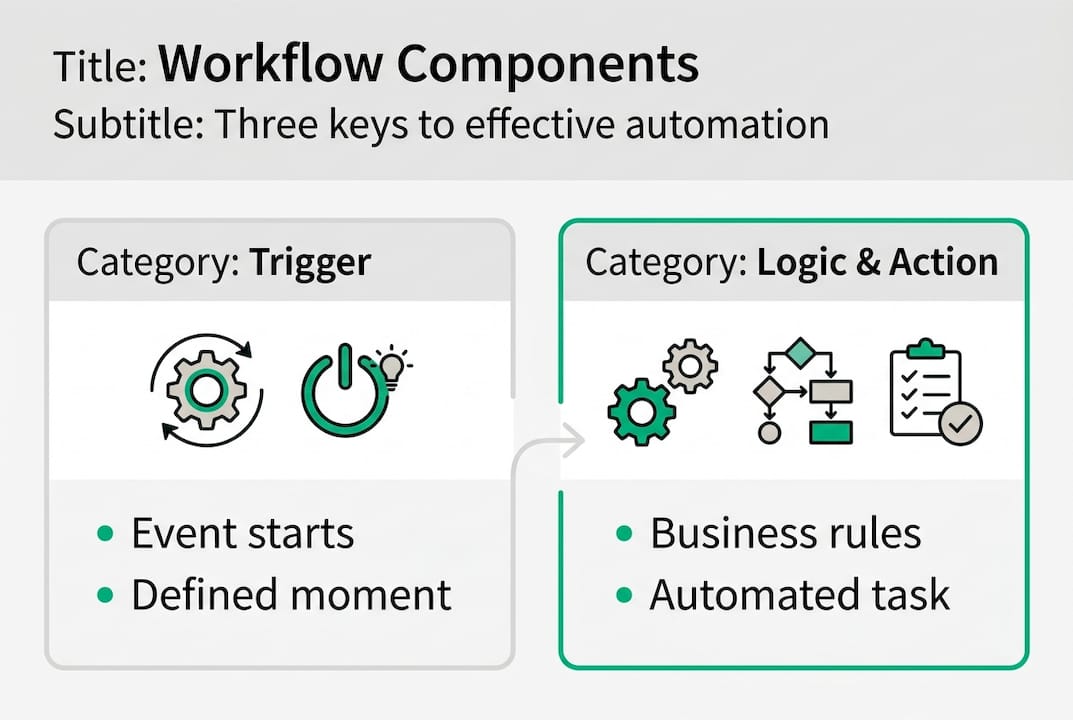
Every automation workflow has three core components: a trigger (the event that starts the process), logic (the rules and AI analysis applied), and actions (what happens as a result). Get these three right and you have a solid foundation. Check workflow automation tips for practical examples across different business types.
Pro Tip: Before choosing a tool, write out your workflow on paper first. If you can't describe it in plain English, you're not ready to automate it.
Map your processes: Preparation before automating
Here's the mistake most businesses make: they buy a tool, connect a few apps, and wonder why nothing works the way they expected. The reason is almost always that they skipped process mapping.

Process mapping means documenting exactly how a task is done today, step by step, including who does what, where data comes from, and where it goes. It sounds basic, but AI workflow success relies on mapping processes, prioritising high-impact tasks, and modularity. You should never automate a broken process. You'll just break things faster.
Here's how to approach it:
- Observe the task in action. Watch a team member complete the process from start to finish. Note every click, every tool, every decision point.
- Document each step. Write it out in sequence. Include inputs, outputs, and the people involved.
- Identify pain points. Where do errors happen? Where does work pile up? Where do people ask the most questions?
- Score each process. Rate tasks by volume, repetition, and error rate. High scores on all three mean strong automation candidates.
- Check compliance requirements. Does the task involve ATO reporting, NDIS records, or Fair Work obligations? Flag these early.
| Automation candidate criteria | Strong fit | Poor fit |
|---|---|---|
| Task frequency | Daily or weekly | Occasional or one-off |
| Rule-based decisions | Yes | Requires judgement |
| Data quality | Clean and consistent | Messy or inconsistent |
| Compliance sensitivity | Manageable | Highly regulated |
Review AI integration best practices to understand how leading Australian SMBs structure their preparation phase. The investment in mapping pays off enormously once you start building.
Pro Tip: Use a simple spreadsheet to score your top 10 processes on volume, repetition, and error rate. The highest combined score is your first automation target.
Design and build your automation: A step-by-step approach
With your target process mapped and validated, you're ready to build. The good news is that you don't need a developer for most SMB automations. No-code and low-code platforms like Make (formerly Integromat), Zapier, and Microsoft Power Automate can handle a wide range of tasks without writing a single line of code.
Here's a practical build sequence:
- Define your trigger. What event starts the workflow? A new email, a form submission, an invoice uploaded to cloud storage?
- Add AI analysis. For document processing or email classification, connect an AI layer to extract, classify, or score the input.
- Set your actions. What should happen next? Update the CRM, send a notification, create a task, generate a report?
- Map edge cases. What happens when data is missing or the AI is uncertain? Build a human review step for these situations.
- Test with real data. Run the workflow on actual examples before going live. Check every output carefully.
- Monitor from day one. Set up logging and alerts so you know immediately when something breaks.
Successful automation uses modular design and includes human-in-the-loop logic for roughly 20% of edge cases. That's not a weakness in your system. It's smart design.
"Most companies are adding AI to workflows without changing the workflows themselves. That's where the value gets lost." Expert perspective
Keep each automation module focused on one task. This makes it easier to update, troubleshoot, and scale. Follow custom AI implementation steps to understand how to layer complexity as your confidence grows. A well-structured step-by-step implementation guide will save you significant rework down the track.
- Use version control for your workflow logic
- Document every change with a date and reason
- Assign one owner per automation to avoid confusion
Troubleshooting and optimising your automated workflows
No automation runs perfectly forever. Data changes, systems update, and business rules evolve. The businesses that get the most from automation are the ones that treat it as an ongoing practice, not a one-time project.
Edge cases in Aussie SMB automation include poor data quality, integration with legacy systems, complex compliance requirements, and AI hallucinations in finance tasks. Each of these is manageable if you catch it early.
Common problems to watch for:
- Data quality issues: Inconsistent formats, missing fields, or duplicate records cause automations to fail silently
- Integration gaps: Legacy accounting or ERP systems often lack modern APIs, requiring middleware solutions
- Scope creep: Automations that start simple gradually expand until they're fragile and hard to maintain
- Compliance drift: Regulatory changes from the ATO or Fair Work can invalidate logic you built 12 months ago
- Over-reliance on AI outputs: In finance and HR tasks, always include a human review checkpoint
Review common automation failures to understand where most SMBs go wrong. Then schedule a regular automation audit every quarter to check performance against your original goals.
"The best automation is the one your team actually trusts. If staff are bypassing the system, that's your signal to investigate."
Key metrics to track monthly: error rate per workflow, average processing time, number of human escalations, and system uptime. Check automation tool insights for benchmarking data relevant to Australian businesses.
Pro Tip: Set a calendar reminder every 90 days to review your top five automations. Ask: is it still accurate? Is it still compliant? Is it still saving the time we expected?
Measuring impact: What success looks like in Australian SMB automation
You've built and optimised your workflow. Now you need to know if it's actually working. Too many businesses automate and then never measure the outcome properly, which means they can't justify further investment or identify what to improve.
41% of AI-using SMBs nationally save over 25% of their total labour time. That's a strong benchmark to work toward, but your results will depend on which processes you've automated and how well they were mapped before implementation.
Key metrics to track:
- Time saved per week: Compare pre and post automation for each workflow
- Error rate reduction: Track how often manual corrections are needed
- Processing speed: How long does the task take now versus before?
- Workflow coverage: What percentage of your total process volume is now automated?
- Cost per transaction: Calculate the cost before and after to quantify ROI
For context, realistic expectations by function include 5 to 10 hours weekly saved on invoicing, 4 to 8 hours on reporting, and 6 to 12 hours on customer onboarding. States like WA and NSW tend to lead adoption rates, but the savings are consistent across industries when implementation is done well.
When calculating ROI, factor in the tool subscription cost, the time spent building and maintaining the automation, and the staff hours redirected. Avoid the common mistake of counting gross time saved without accounting for ongoing maintenance effort. Explore industry applications of AI to see what benchmarks apply to your specific sector.
Why most automation advice ignores the real risks and the real rewards for Aussie SMBs
Most automation guides focus on the upside and gloss over the part where things get complicated. We've seen it repeatedly: a business invests in a promising tool, automates three or four processes, and then quietly abandons it six months later because the results didn't match the vendor's pitch.
The honest truth is that true automation wins hinge on measuring outcomes against expectations and ensuring human oversight for high-stakes processes. That's not a caveat. That's the whole game.
Over-automating without process clarity is genuinely wasteful. We've worked with businesses that automated tasks nobody was checking, producing outputs that were wrong for months before anyone noticed. The fix wasn't more technology. It was clearer ownership and simpler logic.
Culture matters enormously here. If your team doesn't trust the automation, they'll work around it. That creates parallel processes, data inconsistencies, and the exact inefficiency you were trying to eliminate. Staff buy-in isn't a soft concern. It's a hard operational requirement.
Compliance is the other underestimated risk. Australian businesses operate under specific obligations around data privacy, payroll, and industry regulation. An automation that works brilliantly in the US may not meet Australian requirements without significant modification. Always build compliance review into your workflow design, not as an afterthought.
Know when to pause. If a process is changing rapidly or involves significant judgement calls, automate it later. The AI investing insights that matter most are the ones grounded in your actual business context, not generic case studies.
Bring automation to your business with tailored solutions
Ready to move from planning to action? ORVX AI works directly with Australian SMBs across hospitality, logistics, professional services, retail, and more to design and implement automation workflows that actually deliver results.
We don't sell templates. We embed with your team, map your real processes, and build solutions that fit your business and your compliance requirements. Whether you're looking for AI for professional services or a broader automation strategy across your entire operation, we can help you get there without the guesswork. Visit ORVX AI to book a no-obligation consultation and find out exactly where automation can save your business the most time and money.
Frequently asked questions
What types of workflows should I automate first?
High-impact automation tasks for SMBs include invoicing, document handling, and reporting. Start with the task that costs you the most time each week and has clearly defined rules.
What's the typical time and cost saving for Australian SMBs using automation?
Australian SMBs save up to 30 hours per week on admin tasks and can reduce invoice processing cycles by up to 80%, depending on the complexity of the process automated.
What are the risks or pitfalls when automating business workflows?
Key challenges include poor data quality, integration difficulties with older systems, and overestimating ROI. Building in human review steps for high-stakes outputs reduces these risks significantly.
Should I use no-code tools or invest in custom AI agents?
No-code platforms are ideal for quick wins and straightforward processes. Move to custom AI solutions once your automation needs become more complex or you need deeper integration with existing systems.
How can I make sure my automations remain compliant in Australia?
Review your workflows regularly against ATO, NDIS, and Fair Work requirements and include manual review checkpoints wherever regulatory decisions are involved.